
👋 Creating and Setting Up Your Whisber Account
Welcome aboard! 🎉
Before you start exploring AI-powered crypto trend insights, let’s walk through how to create and set up your Whisber account step by step.
Whisber is designed to make things simple — no complicated forms, no confusing setup. Within minutes, you’ll be ready to receive your first AI crypto trend alerts via Email or Telegram. 🚀
🧭 Step 1: Sign Up for a Whisber Account
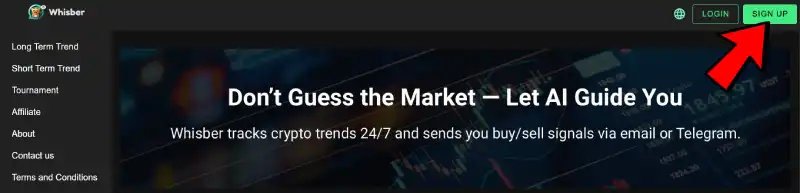
- Visit: www.whisber.com
- Click “Sign Up” on the top-right corner.
- Enter your email address and create a secure password or Sign up with Google Account.
- Agree to the Terms of Service and Privacy Policy.
- Hit “Create Account.”

📩 If you sign up with email address, You’ll receive a confirmation email — click “Verify My Account” to activate.
(If you don’t see it, check your spam or promotions folder.)
But if you sign up with Goolge account, you will directly enter the platform without verification.
⚙️ Step 2: Set Up Your Preferences
Once logged in, you’ll be taken to your dashboard — this is your control center for all trend analysis.
Here’s what to do next:
- Choose your notification channel:
- ✉️ Email — for simple, reliable alerts (7 days Free Trial)
- 💬 Telegram — for instant updates right to your phone (7 days Free Trial)
- Select Trend Types for Notifications:
- 🪙 Hold, Buy , Sell ( Only for premium users)
- Choose to receive Uptrend, Downtrend (Only for premium users)

✅ Tip: Only premium users able to adjust these anytime under Settings → Notifications.
🧠 Step 3: Explore the Dashboard
After setup, head over to your AI Trend Dashboard to explore live data.
You’ll see:
- 📈 Long-Term Trend — your market’s general direction (Bullish/Bearish/Buy/Sell/Hold)
- ⚡ Short-Term Trend — the current momentum and possible reversals (Uptrend/Downtrend/ Hours for current trend)
- 📝 Suggested Actions — practical advice like “Hold,” “Sell,” or “Buy”
These updates are fully automated and powered by Whisber’s AI system — no guessing, no emotional noise.
🔔 Step 4: Connect to Telegram (Optional but Recommended)

If you prefer real-time alerts on your phone:
- Go to your Whisber dashboard → Notification Setting→ Telegram
- Scan and “Connect Telegram Account”
- At our official bot @whisber_bot , Click Menu , you will see three instructions option : /start, /reset, /status
- Click /start for first time and you will be prompt for your registered email address.
- Once you reply your email address, the bot will email you a code. Copy and paste the code to reply the message.
- Once your code is verified, Whisber bot will send you a Welcome message.
- Once connected, you’ll start receiving alerts directly in Telegram and email. For Basic users, you will receive by 0:00 UTC time if there is any signal trend update.
For Premium users, you will receive instantly if there is any signal trend update.
🚨 Only premium users can mute or adjust alert intensity anytime in notifications setting.
💎 Step 5: Upgrade to Premium (Optional)
The free version lets you explore only Long term trend insights, while Premium users enjoy:
- Short Term Trend Singals
- Priority alert delivery
- Customized Signals delivery
Upgrade anytime from your Subscription — it takes just one click.
🛡️ Step 6: Keep Your Account Secure
Security is key 🔐
- Always use a strong password
- Avoid sharing your credentials
- Recommend Sign up using Google Account
Your data and capital awareness are safe with Whisber — we use encrypted storage and secure communication channels.
🎯 You’re All Set!
You’ve now completed your setup — congratulations! 🎉
From here, let Whisber do the heavy lifting.
Sit back, stay informed, and let AI guide your crypto decisions — calmly and confidently.
Next Step: 👉 Understanding the Long Term Trend System